I’ve just finished the Cloud Resume Challenge. The challenge requires me to build an AWS serverless resume, including Infrastructure as Code, and a CI/CD pipeline. You can see my end result here and the GitHub repo here.
Why did I do the challenge?
I want to demonstrate my cloud and DevOps skills in a perceivable way. Something you can see the result, see how I implement it, and see the why behind the scenes.
The Cloud Resume Challenge ticks all the boxes, from front-end to back-end, to AWS and DevOps. I hope this challenge will provide you with a clearer illustration of how I apply my skills on a real-world project beyond my resume and certifications.
High-level picture of the challenge
I group the challenge tasks into the parts below.
- Identity – Manage accounts and users with Organizations and IAM Identity Center
- Front-end – Host a web page on S3 and make it accessible on HTTPS + my subdomain
- Back-end – Create a visitor counter using API Gateway, Lambda, and DynamoDB
- Testing – Run smoke tests with Playwright
- Infrastructure as Code – Store and deploy the infrastructure using Terraform
- CI/CD – Automate testing, building, and deploying with GitHub Actions
Part 1: Identity
I started with manually creating a new AWS account and adding a new user. This worked well for quite a while. However, after the project evolved, it’s better to separate the prod and dev environments to prevent cases where the dev resources accidentally affect the prod.
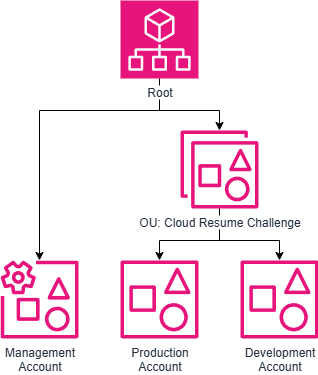
First, I used AWS Organizations to create an organizational unit (OU) for this project and added 2 accounts: prod and dev.
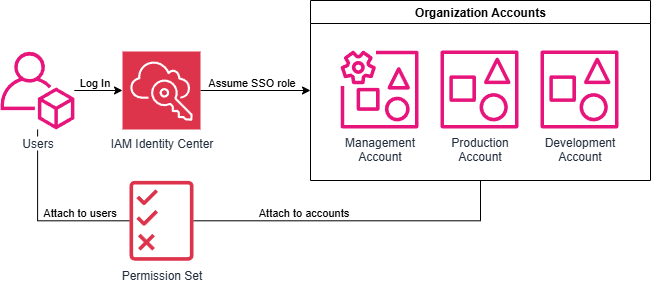
Then, I used IAM Identity Center to set up a user pool and link it to the accounts. Since I’m the only user here, I created a permission set with an admin policy and provisioned it to all the accounts. If there is a new user, I can easily add a new permission set with limited access and assign the user to it. This resulted in an easy-to-maintain and flexible user management.
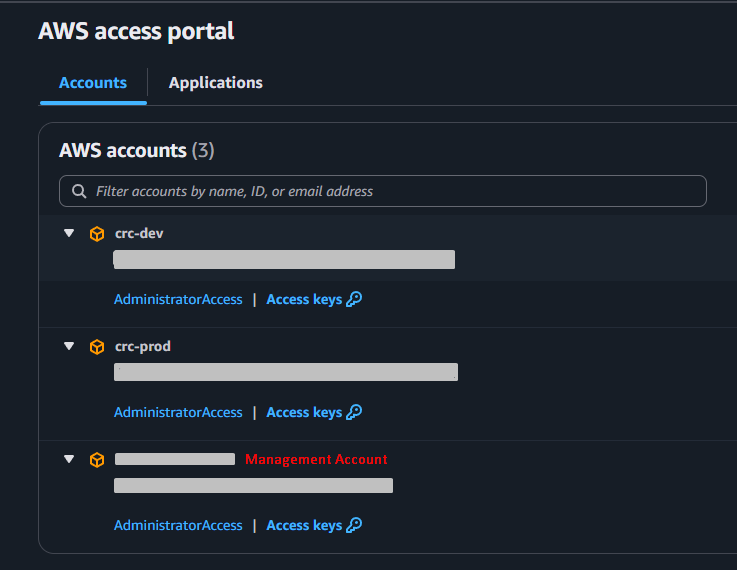
With IAM Identity Center, I can also get a temporary session key to use with AWS CLI and Terraform. This is more secure than storing an IAM key pair on the PC.
Part 2: Front-end
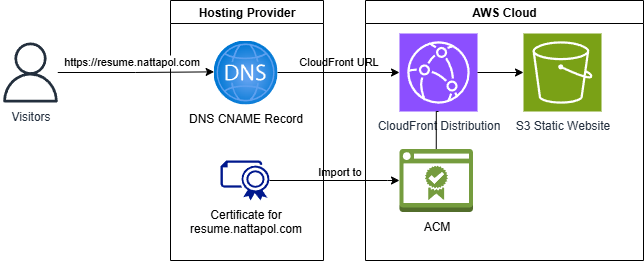
I created an S3 static website and set up CloudFront to allow HTTPS. I had my site hosted on my hosting provider, so I handled the DNS by adding a CNAME record there instead of using Route53. I already had my site certificate on Let’s Encrypt, so I imported my certificate to ACM.
Part 3: Back-end

The back-end handles the page view (AKA visitor counter). Here is how it works.
- JavaScript sends a request to API Gateway.
- API Gateway calls the Lambda function (written in Python).
- The Lambda function increments and returns the DynamoDB visitor counter.
- Use CORS to only allow requests from the resume URL.
Part 4: Testing
I skipped the unit test and the integration test, and only do the smoke test. Why?
- For the unit test, there is not much to test because the code takes no input and just returns a status code with the value from DynamoDB. I need to test that DynamoDB works fine instead.
- For the integration test, there is only the API Python code for the visitor counter. So, I don’t need to do any integration.
For the smoke test, I test whether the visitor counter value shows up on the webpage and the value increases after a subsequent visit. This should be enough to show that all the components work. If the test fails, I can check the test error message and trace down the logs of each component.
As I only need a smoke test here, I chose Playwright to do the testing. It works with Python, which I’m more familiar with than JavaScript. It has a low learning curve, so I was able to learn it and set up simple test cases quickly.
Part 5: Infrastructure as Code
The challenge suggests using SAM for an Infrastructure as Code tool, since it’s serverless. However, I chose to do it on Terraform instead to prioritize finishing the project first with the tool I’m proficient with. SAM and CDK are interesting, and I’ll learn them on my free time later.
├── environments
│   ├── dev
│   │   ├── main.tf
│   │   └── providers.tf
│   └── prod
│       ├── main.tf
│       └── providers.tf
└── modules
    └── crc
        ├── backend.tf
        ├── frontend.tf
        ├── global.tf
        ├── providers.tf
└── variables.tfI organized the code by separating the infrastructure code and the environments (prod and dev). Since the project isn’t big and I don’t reuse each component, I put all the infrastructure code into one big module, and group the resources by file names (front-end, back-end, global). Then, I called the module with different variables for different environments.
Part 6: CI/CD
I chose to do the CI/CD part with GitHub Actions. Although I’m more proficient in TeamCity, it requires a server, so I use my existing GitHub Actions free tier instead.
.github
└── workflows
    ├── back_end.yaml
    ├── front_end.yaml
└── smoke_test.yamlI have 3 workflows: front-end, back-end, and smoke test. I reuse the smoke test workflow on both front-end and back-end.
Front-end workflow

Back-end workflow

For security, I store the secrets and environment variables in GitHub repo secrets and security. I set up an IAM role with OpenID Connect to allow GitHub to assume the role and have the necessary permission to do what it needs.
This is a quick, simple implementation. I prioritize finishing the project to have something first, and then improving it as time goes by. In the future, I plan to make it more sophisticated and closer to the real-world best practice by:
- Add linting and unit testing.
- Require a feature branch to pass the test before being able to merge to production.
My thought on the challenge
I didn’t expect to learn this much doing this challenge! Most of the tasks are what I do in my job. However, having to implement everything from scratch without a well-constructed process made me deepen my understanding of the subjects.
I used TeamCity in my previous job. Now I have the chance to dive deeper into GitHub Actions. (I even took a full course on it!) There are some different concepts and ways we implement things here and there, but I found that the fundamentals are still the same, and I can learn and apply GitHub Actions pretty quickly.
All in all, I think this is a good personal project that every cloud engineer and DevOps engineer should try. No matter how senior they are, we can customize this project to be as advanced as we want.
I have many ideas that I have to cut out from the first version, or else I won’t deliver anything. To name a few, monitoring/tracing, dev-and-prod CI/CD, migrating my site to AWS, using Route 53, maybe even using Kubernetes to host my site, etc. Please stay tuned for more updates!